Skip to content

Jazz-Sax.Com

Jazz-Sax, all things Jazz and Sax

  • About
  • Home
  • Gallery
  • Polls
  • Articles
  • Toggle search form

Donations and Stuff

Posted on January 15, 2011January 15, 2011 By ericdano 9 Comments on Donations and Stuff

Jazz-Sax has been around a LONG TIME. I’d say one of the longest running sites, since 1997 I believe. And all the stuff here is free. I do require you to register in the hopes that perhaps people comment on stuff, ask questions, etc, etc. I’m not going to password protect posts. Nor require a subscription (I hope that link people are not paying to see!). It is kind of frustrating that some of the guys on the net are charging for things like fingering charts when other people like Charles McNeal are giving away amazing transcriptions for nothing. Something is wrong out there!

Sometimes I receive donations. That is a great thing. Someone just donated some money for one of the arrangements I have up. Thank you very much. I just wish I had time to put more stuff up. More stuff is coming…..soon I hope.
Articles

TED – Your Brain On Improv

Posted on January 12, 2011 By ericdano No Comments on TED – Your Brain On Improv

TED talks are always interesting. This one a little more so than usual.

Articles

iKlip

Posted on January 11, 2011 By ericdano No Comments on iKlip

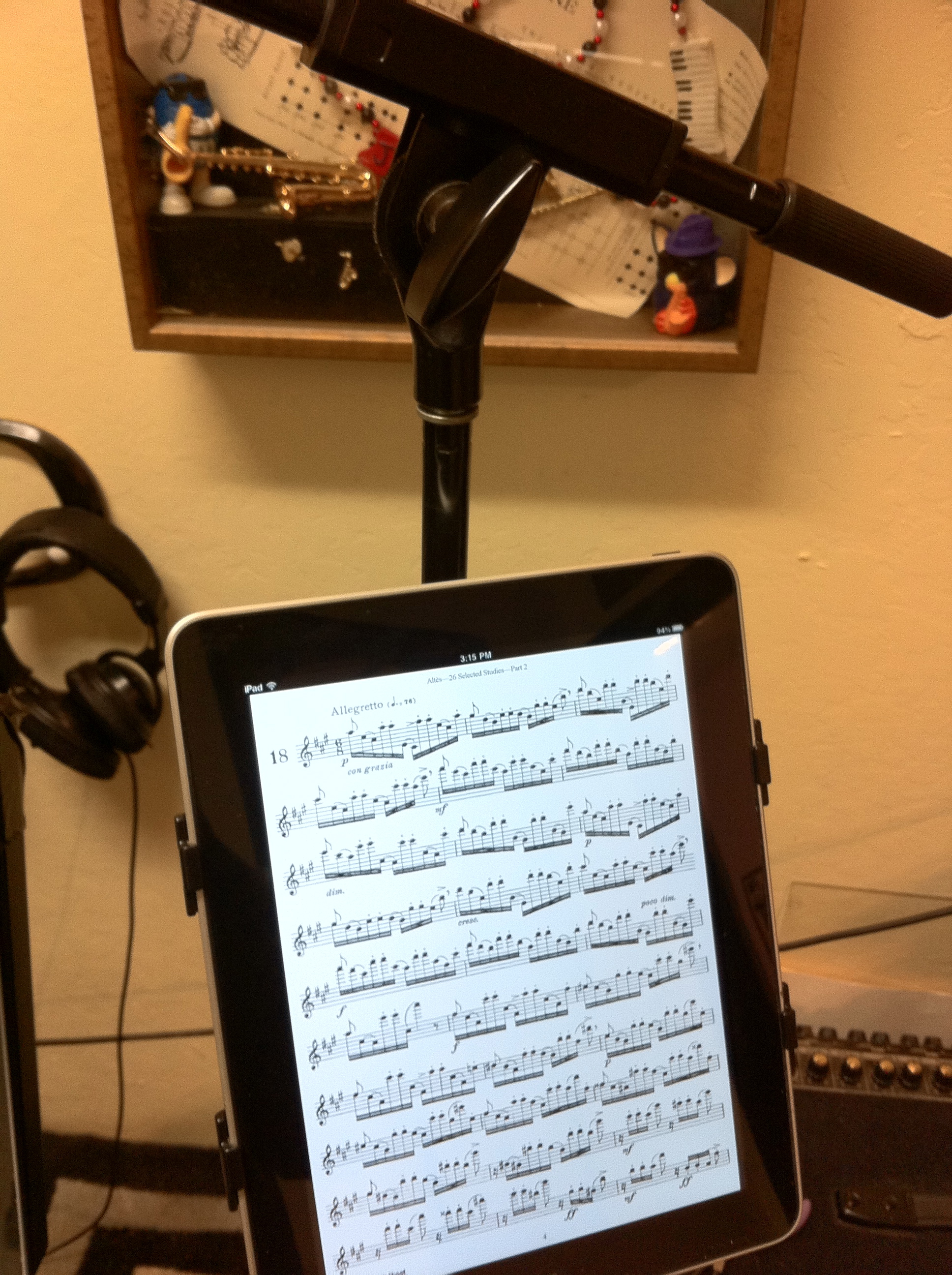
I received my iKlip today. So, now, I can live the good life and read music on my iPad anywhere? Well, not quite.

If you read the first part of the iKlip page, it says: “IK Multimedia introduces iKlip™ — a multi-angle lightweight iPad microphone stand adapter. Now you can take your favorite iPad™ music apps on stage for live performance.”

But the next paragraph says: “The new iKlip for iPad makes it easy for you to use your iPad in any live setting — on stage, in the studio, at school or in the boardroom. With its multi-angle adjustable design, you can now securely position your iPad for optimal viewing and accessibility, while all controls, buttons and connection ports remain free from obstruction.”

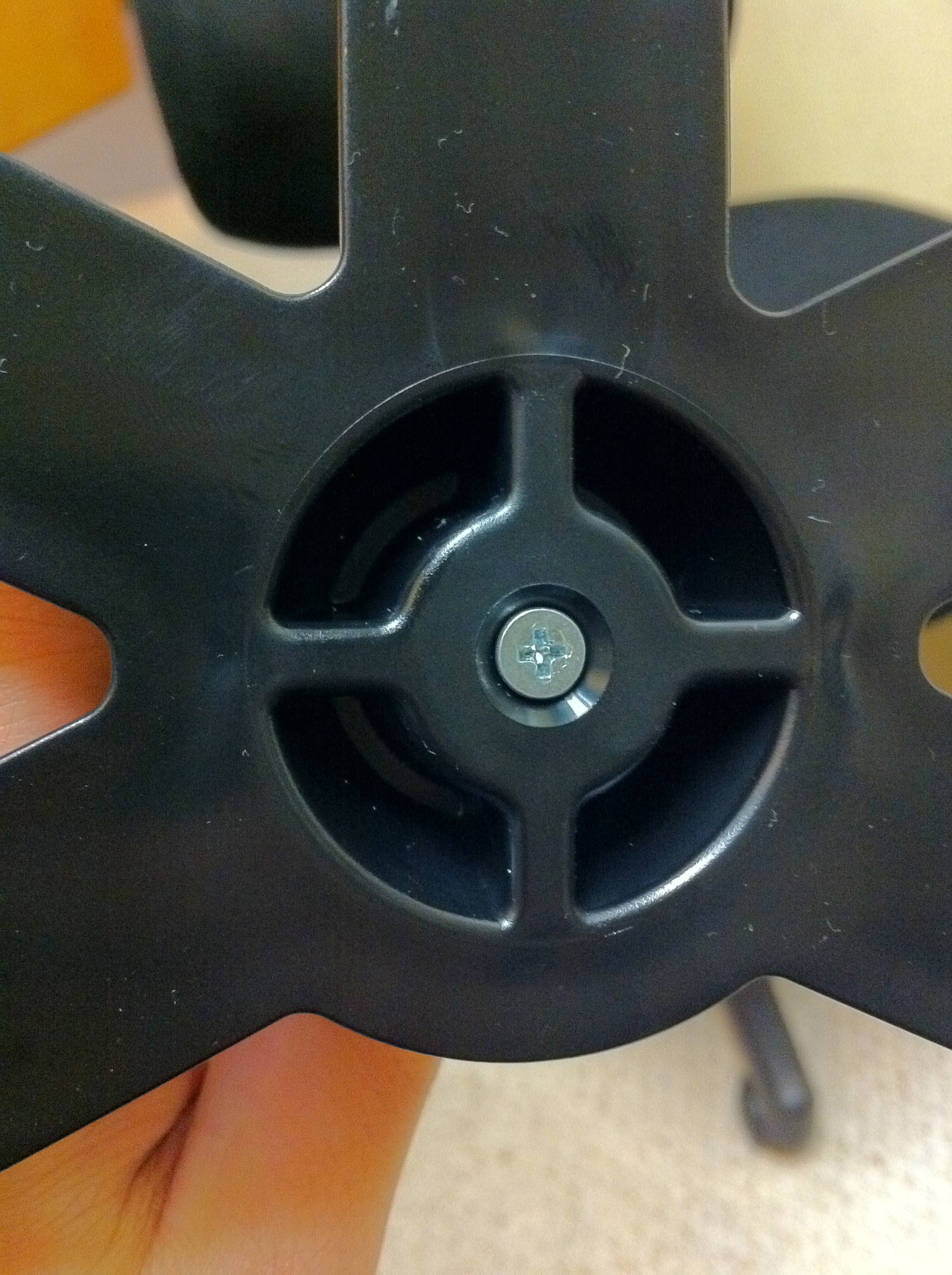
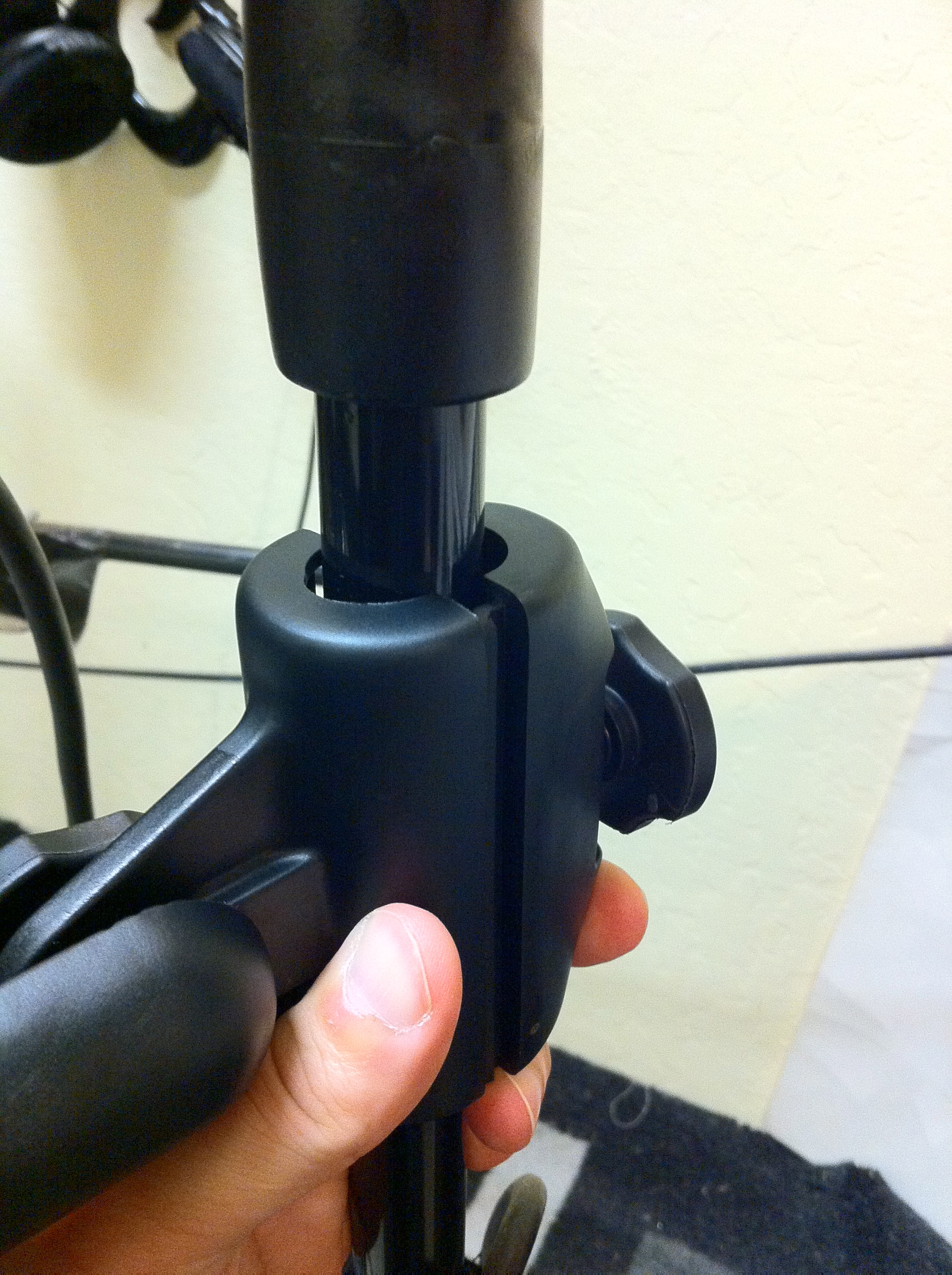
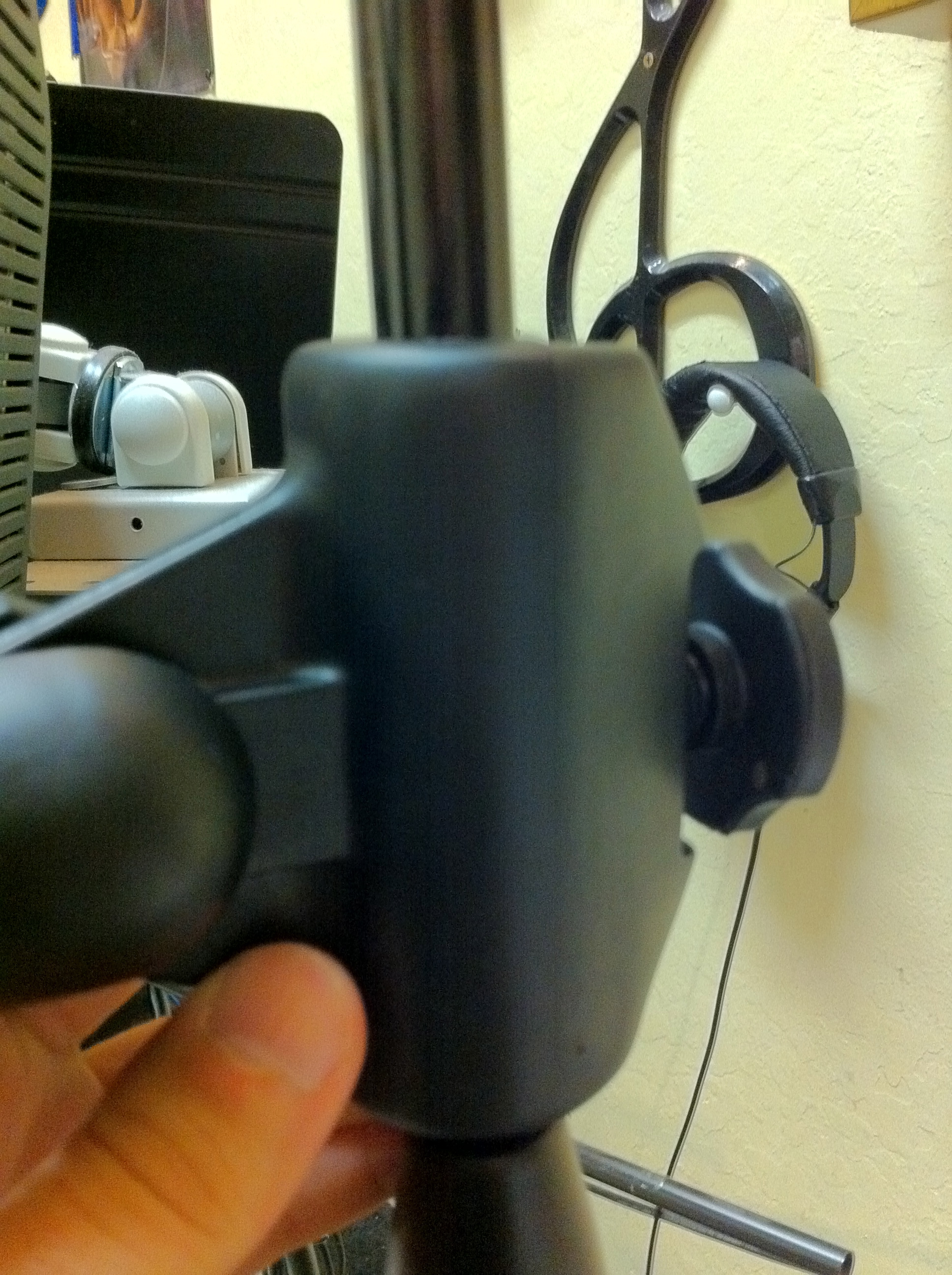
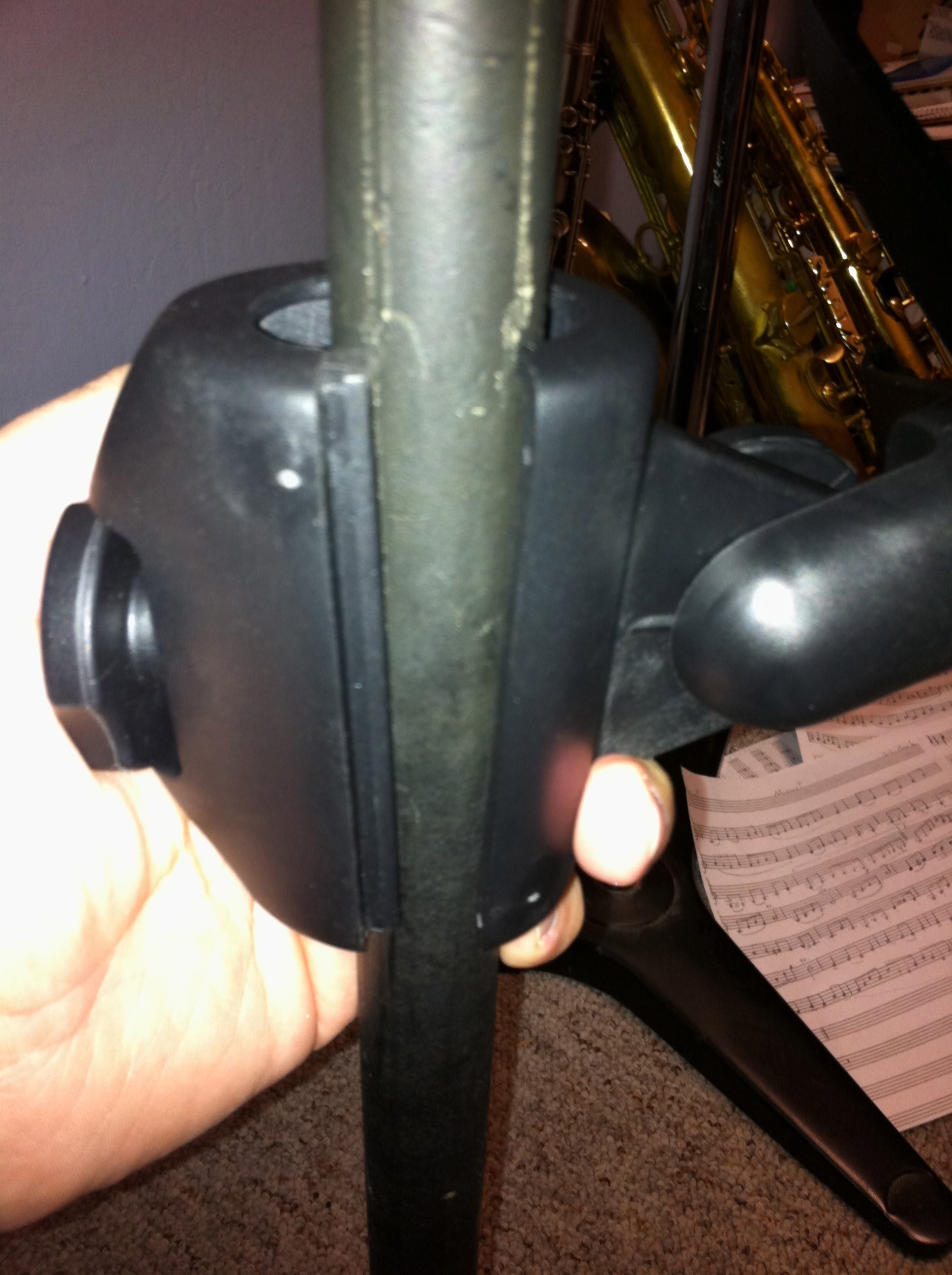
So, are schooling supposed to have a microphone stand for each kid? The iKlip DOES NOT FIT ON A MANHASSET stand. Ok, technically, if you were standing, had it extended a ways and were over 5′ tall it fits, but certainly NOT if you are sitting. The connecting thing does NOT FIT AROUND a Manhasset stand. Period. HUGE design flaw. Seriously. Even my simple Pop Filter has an adjustable mount that can handle various stand sizes.

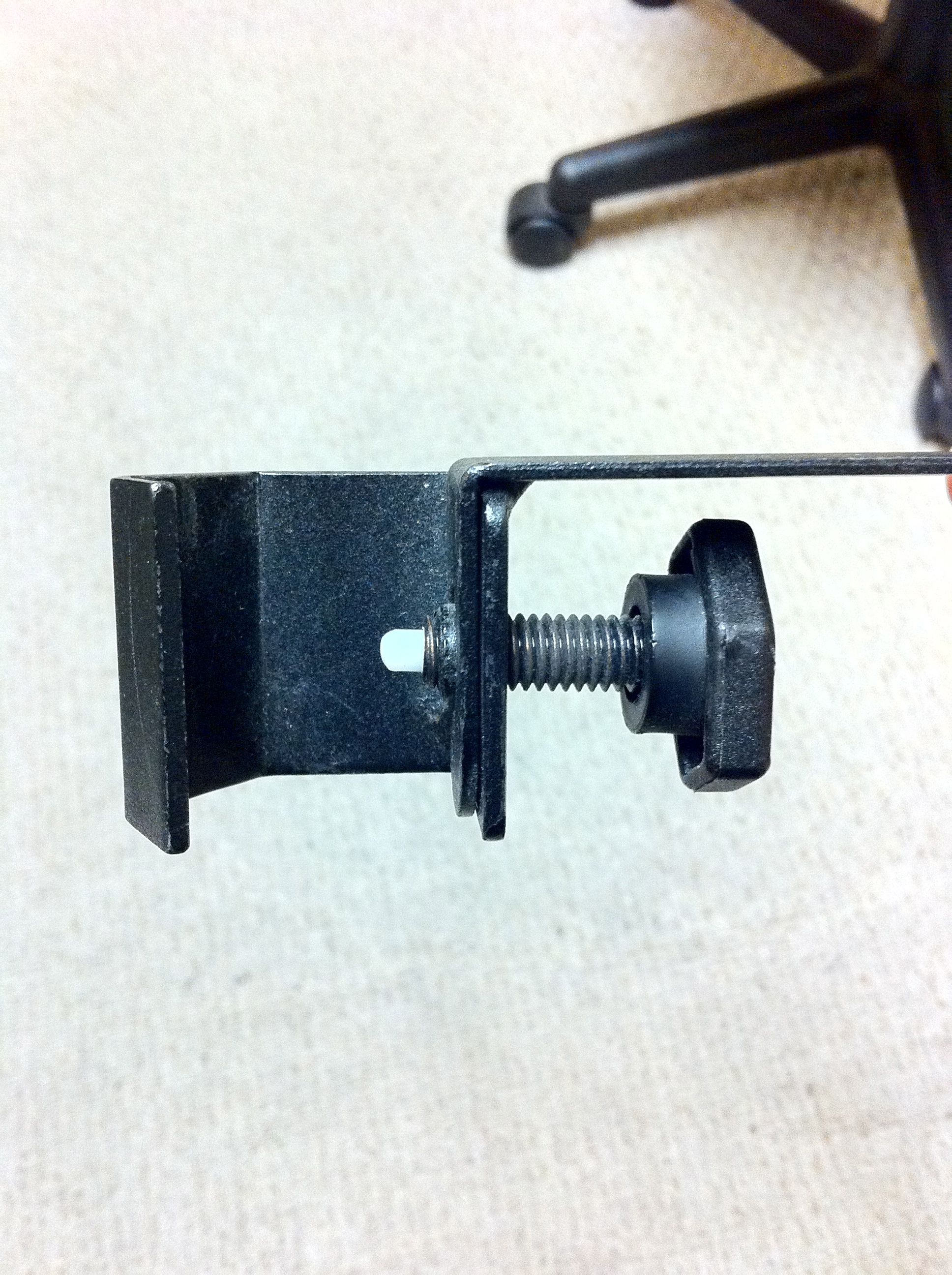
SECOND major problem is that if you want to rotate it from page to landscape, you need to loosen a screw, turn it, and then put it back. Seriously? They couldn’t come up with something else? I mean, it’s made in Italy, did they totally not see the problem? It’s like having a Ferrari with like little Yugo tires on it. You have this beautiful stand. And it is very nice, except there is this screw……ugh!

A MINOR grip would be that you have to take your iPad out of its case to use it. Not a BIG deal compared to the two other problems, but if the two other problems didn’t exist I would probably say that would be the ONLY minor complaint I have about it.

IK Multimedia had a chance to hit it out of the park. The two design flaws are huge in my opinion. The totally missing that it can’t attach to a music stand? Stupid. And the screw adjustment? Stupid. I see about maybe 20 times someone being able to get the screw attachment in, but heaven help you if you screw the screw in at an angle.

I give this a 5 out of 10. For $40 its alright. Don’t plan on using it with a music stand, especially Manhasset ones. And don’t plan on switch it between landscape and portrait a lot. If you can live with these limitations, it might work for you.

Pictures I took, including me showing it will not fit around the base of my microphone stand, but will on the upper part, of the infamous screw, of me showing it not fitting on a Manhasset stand, and of my $10 mic pop filter stand attachment that IK Multimedia SHOULD HAVE designed/used.

img_0288

img_0290

img_0292

img_0294

img_0295

img_0301

Reviews

Spam and Stuff…..

Posted on January 8, 2011 By ericdano No Comments on Spam and Stuff…..

Seems like the emailing of user registrations was not working for a while. Sorry about that. Seems that a lot of spammers were registering using bogus email addresses and then the server would try to send them off via gmail, and they would bounce back, and gmail would then restrict the account for a few hours. Ugh.

That has been taken care of I think. I also weeded out inactive accounts….so if you registered at some point and didn’t do anything other than take the PDFs here, well, chances are your account was deleted.

Happy New Year!

News

Best Practices For Preparing Music for an iPad

Posted on January 2, 2011January 2, 2011 By ericdano No Comments on Best Practices For Preparing Music for an iPad

I spent most of new years day going through binders and either scanning or shredding (sometimes both) music I have. I was amazed at how many binders of things I had, and a LOT of it consisted of my II-V patterns and various exercises I wrote for myself.

Anyhow, if I had the finale file to something I had in the binder, I shredded the paper version and proceeded to tweak the finale file to better take advantage of the iPad. Here is what I learned.

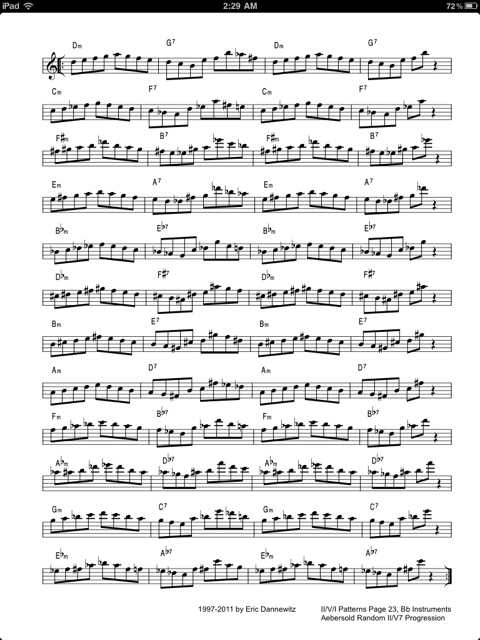
First, you can make the margins practically nothing. In one version of my II-V patterns I have it formatted for a double sided printer so whatever side the holes are to be on, it is 0.5″ from the end of the page on the right and 0.75 on the left (to allow for holes). On an iPad, you can set that to 0.1 all around. The results are quite stunning.

Standard Page with 0.5 Margins

Page with 0.1 Margins on Right and Left

Second, I was able to enlarge the size of the music with 0.1 margins. The result is a page that takes advantage of the iPad’s display, and is easier to read than the pain Jane dumping a standard page to PDF to iPad. So, a note to all you people providing stuff out on the web and who are iPad or Tablet enthusiasts…..you need to reformat your PDFs. It doesn’t take much, and in Finale it was simply making a new Part and then tweaking the layout. About 3 to 5 minutes of work for something that looks a lot better.

Here are the patterns formatted for iPad. I will be doing a mass update of files to include iPad versions. Enjoy.

  Random II-V Patterns - Bb (iPad) (4.9 MiB, 94 hits)
You do not have permission to download this file. Go register first.

Articles, Sheet Music

unRealBook vs. GigBook

Posted on January 1, 2011January 2, 2011 By ericdano No Comments on unRealBook vs. GigBook

I received some iTunes gift cards from students this year, same as in previous years, and I decided to use some of them on two iPad apps that a lot of people have been buzz about, unRealBook ($4.99) and Gigbook ($4.99).

Let me start off by saying that both programs absolutely suck on how you get stuff into them. Part of that is Apple’s fault. It would be nice if Apple would allow access to the area where iBooks are being stored, but that doesn’t seem to be the case at the moment, though they now allow Apps to talk to iTunes and play music from your library which unRealBook does. It would be idea for both of these developers to come up with something to allow easy importing/syncing of PDFs. I suppose one could use DropBox.

A slicker alternative, PadSync ($9.99) works great. Strangely enough on yet another iPad Music reading App recommended it. Yet, this too doesn’t really offer anything I really want. I would LIKE to have say a folder called SaxBooks and have ONE of these programs, when I sync to iTunes or run some syncing program, update any changes or additions. Is that so much to ask? Hence, this is why I really like using iBooks. It syncs to iTunes, and I can keep all my PDFs in iTunes, tag them, etc.

Moving on past the pain in the butt that is putting files on you iPad into one of these programs, what can you expect? Which one works better? First, lets look at Gigbook. This is a slick program. You can organize scores into Binders, make set lists, organize by composers, genre, key, tempo, time. You can make it part of a Collection so you can bookmark 400 page PDF fake books for songs. It feels like a proper iPad App, like my favorite iPad App Reeder.

UnRealBook has a lot of neat features. You can draw on your music, different pens, colors, etc. Save it. Undo it. Email the changes. Very cool. You can link a PDF to a song in your iTunes library and play it. VERY COOL. You can export Pages, send files via Bluetooth, Get files from DropBox or a URL, email PDFs, pages. There are lots of things you can do. However, the navigation around the program isn’t very “iPad-like”. Plus, once you’ve gotten used to the Binders and Collections that GigBook has…..

It’s a tough call to pick a winner. Feature wise, unRealBook is the best. The ability to mark up your PDFs and play things out of your iTunes library and attach those things to PDFs. Total thumbs up. Gigbook needs to step up and have these things. Interface wise, Gigbook is clearly the best. And the Collections and Binders are pretty invaluable…….

Winner…..Gigbook. Of the two, it is the one that is really the best thought out and implemented. If unRealBook redid its interface, and implemented something similar to Binders and Collections, then it would be the winner.

Couple of notes:
Both programs work with the Airturn BT-105 (seriously, who the hell names these things).
Both programs DO NOT and SHOULD read PDF fields like Title, Author, Subject and Keywords that are in PDFs. I take the time to tag my PDFs, it would be nice for these programs to read them.
Both programs should be able to read and use bookmarks in PDFs. Seriously, I bookmark important PDFs or RealBooks I have in PDF format.
Both programs should allow cropping of PDFs. After I did this experiment, it can really help make things more readable.
Both programs should have contrast controls, like GoodReader.
Either Apple or these guys really should find a way to access PDFs in iBooks or come up with some easy way to manage PDFs between the Mac and iPad.
AND it would be nice to have TEXT searching in PDFs. Programs like GoodReader allow this, and for 400 Page RealBooks, it would make finding a song easier.

So, Gigbook. Now if someone wants to send me forScore 2 ($4.99) to play with………I might have to revisit all this (HINT HINT). Or if GoodReader had a few of the features of Gigbook and unRealBook (Binders, ability to draw on PDFs).

Articles, Reviews, Sheet Music

Kitara

Posted on December 19, 2010 By ericdano No Comments on Kitara

Misadigital is going to release their Kitara Guitar in April. While it is a guitar, the concept could be perhaps taken to the realm of EWI. Imagine perhaps two touch screens coupled with a breathing sensor…..hmmm…..Yamaha? Akai?

Articles

iPad in Education

Posted on December 14, 2010December 14, 2010 By ericdano No Comments on iPad in Education

From the Santa Cruz Sentinel:
“Before, during and even between classes at Hillbrook School this fall, seventh-graders have been spotted on the Los Gatos campus, sometimes burbling Spanish or Mandarin phrases into the glowing screen in their hands, other times staring into it like a looking glass,” Bruce Newman reports for The Mercury News.

“iPads — the Apple of almost every adolescent’s eye — are being provided to students at several Bay Area public and private schools this year, including Hillbrook, which claims to be the only K-8 school in America using tablet computers in class and sending them home,” Newman reports. “This has led to a lot of 12-year-olds swanning around the wooded hillside campus, talking to their iPads.”

It just makes sense. It’s cheaper, more “green”, and more efficient. Now imagine having all your music books in an iPad. Or all that Lit and Analysis stuff accessible instantly. Or having some great ear training Apps to help with sight singing. Soon……it’s happening as we speak…..

Articles

Best Practices To Scan Old Books into PDFs

Posted on December 12, 2010December 14, 2010 By ericdano No Comments on Best Practices To Scan Old Books into PDFs

Yes, the iPad is amazing. Ok, sure, there are some other makers coming out with devices too. Regardless of what you get, you are probably at some point going to want to convert some of your tattered books into digital format. But how? What should I use?

Fear not, here are some guidelines to do it as I’ve converted quite a few of my old books that were falling apart into excellent PDFs. First, you need a scanner. A sheet feed scanner on something like a Brother 7340. I used a Brother 7420 myself, and it works great. Good Macintosh support. You could use a lot of other different solutions as well, but you really need to have a sheetfeeder scanner (ie: you can put 20+ pages on it and let it do it’s stuff).

Second, you need some sort of paper cutter to cut the bindings off, and any books that are oversized (like Rubank) need to be trimmed a little to fit in the scanner’s sheetfeeder. You can use scissors I suppose, but a paper cutter is easier, cleaner, and does it better.

For scanning, I’ve found that 300dpi B&W uncompressed TIFF is the way to go. I don’t do JPG or compressed TIFF because I am going to let the PDF part of the process do all the compression when I’m ready. I put in a stack of pages in the sheet feeder, and have it go. When its done, then I put the other side through the scanner. When that is all done, I go through the scans and number them (01…09….20….etc) and make sure that the scanner didn’t take two or more pages in by mistake (it will happen) and to see that they pages have all the stuff on the page (as in nothing was cut off during the scan). The cover and back I’ll generally use the flatbed scanner on the unit to make color scans. The covers are usually thicker anyways and don’t go through the feeder well (if at all).

Ok, so, now you have all these TIFFs, I use Adobe Acrobat to assemble them (“Combine Files into PDF”). The middle setting (lower right filesize) is the setting I use, into a Single PDF file. You also need to make sure the pages are in order then go.

Acrobat will then assemble all the files together, and display the result. Now, the next thing to do, which is why I use Acrobat, is to use the Tools->Recognize Text. Why you say? Well, it does OCR any text in the PDF, which is helpful if you need to search something, but it also will do things like straighten any crooked pages and stuff. Little things that will make your PDF look great. So run it. When it is done, then do an Apple-D and type in info for the PDF like the title, author, some key words. Then save.

Done! Now you have a nice digital copy for yourself. It is really great using the iPad to practice with, it remembers where you were in each PDF, and you can make bookmarks (which can transfer to your computer), etc. Notes. Great stuff. Here is an example page

Articles

Electro-Swing

Posted on December 11, 2010 By ericdano No Comments on Electro-Swing

This has been happening in the SF Bay area for a while, and it seems to be happening in the UK now as well.

“A paddle steamer moves slowly down river, over-run with a gaily dressed throng of party animals in cloche hats, homburgs, spats, waistcoats, ball masks, and feather boas. Moustaches – some waxed – flourish. The bar sells out of champagne within an hour of leaving dock and the dance floor fills with dandy couples throwing each other about. This is not a scene from F Scott Fitzgerald, but Halloween 2010 on Steamboat Bordello, a floating event on the Thames, and the speakers are pumping out a striking new music that looks set to be the sound of this season’s parties: a revamped version of Jazz Age flavours that mixes Dixieland brass with electronic percussion.”

Check out the video as well. Good stuff. I like this….

Articles

The iPad as a….WTF…..

Posted on December 10, 2010December 10, 2010 By ericdano No Comments on The iPad as a….WTF…..

Honestly, this is lame……I’m all for things iPad, I love the iPad, but using it for this is just…..stupid and hokey.

However, Gorillaz releasing an album that they did on an iPad for free is something that I like.

Videos

James Moody Dies

Posted on December 9, 2010December 10, 2010 By ericdano No Comments on James Moody Dies

James Moody passed away today. Sad. Another legend has left the building…….

UPDATE: NYTimes has an article up now about him

Articles

Make Your Own Fingering Charts EASILY!

Posted on December 9, 2010December 9, 2010 By ericdano No Comments on Make Your Own Fingering Charts EASILY!

Bret Pimentel has hit it out of the park with this. Simply the best thing I’ve come across on the net for months……his online Fingering Diagram Builder…which also works on the iPad!

I’m pleased to present something I’ve been working on, on and off, for a while now. I’m pretty excited about it, and I hope you will check it out and let me know what you think.

This project developed from my own need to quickly and easily create fingering diagrams for the woodwind instruments that I play and teach. Frequently I find myself scribbling saxophone altissimo fingerings onto a scrap of paper during a private lesson, cutting-and-pasting at the photocopier to put together simplified charts for a woodwind methods class, or penciling cryptic markings into musical scores to remind myself which pinky finger to use.

Simply amazing and well overdue on the web. Thanks Bret!!!!!

Articles

Jazz Robots

Posted on December 8, 2010December 9, 2010 By ericdano No Comments on Jazz Robots

Found these via Casa Valdez

Read More “Jazz Robots” »

Videos

The Original Auto-Tune

Posted on December 3, 2010 By ericdano No Comments on The Original Auto-Tune

Ok, this is pretty darn cool….

Videos

Posts pagination

Previous 1 … 62 63 64 … 86 Next
  • Articles
  • Featured
  • News
  • Reviews
  • Sheet Music
  • Sheet Of The Week
  • Videos

Akai Apple Bad Band-in-a-Box Big Band Brecker Computer Education EWI Finale gear History Humor iPad ipod itunes Jazz Katy Perry mac makemusic Maroon 5 Michael Brecker Music Obit Opinion OS X PGMusic pop Practicing protools Recommended Recording Saxophone Sheet Music Sheet Of The Week SmartMusic Software Taylor Swift technique Technology Technology video Wordpress wtf youtube

Meta

  • Register
  • Log in
  • Entries feed
  • Comments feed
  • WordPress.org

Donate

Donate to Jazz-Sax.Com

Downloads

  • Zinn Practice Regimen III (592.7 KiB, 52,858 hits)
    You do not have permission to download this file. Go register first.
  • Zinn Practice Regimen (211.9 KiB, 20,275 hits)
    You do not have permission to download this file. Go register first.
  • Breckerisms - Michael Brecker Type Patterns (379.6 KiB, 15,074 hits)
    You do not have permission to download this file. Go register first.
  • II-V-I Patterns in Bb (4.6 MiB, 12,515 hits)
    You do not have permission to download this file. Go register first.
  • II-V-I Patterns Reference (600.9 KiB, 12,113 hits)
    You do not have permission to download this file. Go register first.
  • II-V-I Patterns in Eb (4.7 MiB, 11,718 hits)
    You do not have permission to download this file. Go register first.
  • II-V-I Patterns in Bb Pages 1 to 100 (1.7 MiB, 11,501 hits)
    You do not have permission to download this file. Go register first.
  • II-V-I Patterns in Bb Pages 201 to 289 (1.6 MiB, 11,002 hits)
    You do not have permission to download this file. Go register first.
  • II-V-I Patterns in Bb Pages 101 to 200 (1.9 MiB, 10,987 hits)
    You do not have permission to download this file. Go register first.
  • II-V-I Patterns in Eb Pages 201 to 289 (1.6 MiB, 10,925 hits)
    You do not have permission to download this file. Go register first.

Bb Fingering

View Results

Loading ... Loading ...

Downloads

  • Zinn Practice Regimen III (592.7 KiB, 52,858 hits)
    You do not have permission to download this file. Go register first.
  • Zinn Practice Regimen (211.9 KiB, 20,275 hits)
    You do not have permission to download this file. Go register first.
  • Breckerisms - Michael Brecker Type Patterns (379.6 KiB, 15,074 hits)
    You do not have permission to download this file. Go register first.
  • II-V-I Patterns in Bb (4.6 MiB, 12,515 hits)
    You do not have permission to download this file. Go register first.
  • II-V-I Patterns Reference (600.9 KiB, 12,113 hits)
    You do not have permission to download this file. Go register first.
  • II-V-I Patterns in Eb (4.7 MiB, 11,718 hits)
    You do not have permission to download this file. Go register first.
  • II-V-I Patterns in Bb Pages 1 to 100 (1.7 MiB, 11,501 hits)
    You do not have permission to download this file. Go register first.
  • II-V-I Patterns in Bb Pages 201 to 289 (1.6 MiB, 11,002 hits)
    You do not have permission to download this file. Go register first.
  • II-V-I Patterns in Bb Pages 101 to 200 (1.9 MiB, 10,987 hits)
    You do not have permission to download this file. Go register first.
  • II-V-I Patterns in Eb Pages 201 to 289 (1.6 MiB, 10,925 hits)
    You do not have permission to download this file. Go register first.

Sites

  • A-NO-NE Music
  • Aebersold Music
  • AKG Headphones and Microphones
  • Apple
  • BopLand.org
  • Boston Sax Shop
  • Bret Primentel
  • Casa Valdez Studios
  • Charles McNeal
  • Create Digital Music
  • Dorico
  • Eric Dannewitz
  • EWI Musician
  • EWI Reason Sounds
  • EWI-EVI Page
  • Greg Fishman
  • Hollywood Saxophone Quartet
  • Horn Pedalboard Subreddit
  • iRockJazz
  • Jazz Standards
  • Jazz-Clarinet
  • Jazz-Flute
  • Jazz-Oboe
  • JazzBariSax.Com
  • Joe Allard.org
  • Kenyon Carter
  • M-Audio
  • McDSP
  • Metric Halo Labs
  • Michael Brecker
  • MOTU
  • Norbert Stein
  • PG Music
  • Phil Woods
  • Ricci Adams’ Musictheory
  • Sammy Nestico
  • Save A Bunny
  • Sax Pictures
  • Seventh String Software
  • Shure Notes
  • Sound On Sound
  • Tape Op
  • USA Horn

Copyright © 2025 Jazz-Sax.Com.

Powered by PressBook WordPress theme